Excel finally did this and Finance didn't notice
3 Minute Read
There is a tip I share fairly regularly in finance circles that gets a remarkably consistent reaction. Regardless of seniority or experience, it tends to produce some variation of “how did I not know that?!”.
It isn’t complicated (it seems obvious in retrospect) and it isn’t even new any more. Excel just added it quietly and most people missed it.
The reveal
When you select a range of cells, the status bar at the bottom of the screen shows you a summary of your selection. Typically Average, Count and Sum along the bottom right.
For years, those values were read-only. I know this because I tried everything. Clicking on them, trying to highlight and copy the number directly, anything to avoid squinting at that little number in the corner while manually keying it somewhere else and checking I hadn’t mistyped it.
At some point Excel quietly changed that. I had been trying it at different times for so long, and then one day I stopped in shock. It had worked. The cell could now be copied!
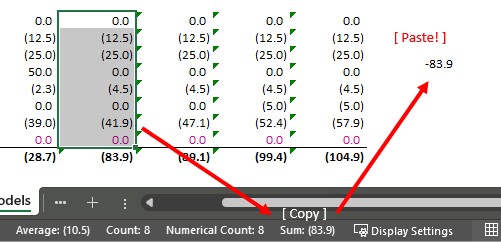
To use it: select your range, look at the status bar, find the value you want and one touch with your left mouse button is all you need to add it to your clipboard. Then paste it wherever you need it.
Left click to touch and copy, then paste. So simple!
While you’re down there…
Right-click anywhere on the status bar and the full Customise Status Bar menu appears allowing you to control everything from page numbers to Caps Lock indicators. Within that list, you can also choose which aggregates are displayed. Sadly the options are more limited than I might have hoped with no Median or Standard Deviation, but I’ll still take the win!
- Average
- Count
- Numerical Count
- Minimum
- Maximum
- Sum
Tick whichever you want and they appear instantly whenever you have a range selected. Useful if you regularly need a quick Min or Max without writing a formula.
Does this matter?
In financial modelling and reporting you are constantly pulling quick totals, checking subtotals and formulas, carrying out reconciliations or sense-checking numbers. The status bar copy removes the need for any temporary formulas (remember those averages for commentary?) and reduces risk of typing errors. Now you can just select the range, copy, paste, move on.
The reaction
Every time I show this to a finance team, at least one person who has been using Excel for years goes quiet for a moment and then says something unprintable. For those wondering why I kept trying something that didn’t work, I did email the Excel team with the suggestion… sometime last decade. They got there in the end!
If you are reading this and thinking “but I knew that”, consider whether the person next to you does.
Small features add up to a noticeably faster workflow.